Results for Core Java Pratical Slip Answers

Savitribai Phule Pune University T.Y.B.B.A.(C.A.) Core Java Practical Slip 30 Answers

December 30, 2021

 Write a ‘java’ program to display

Slip 30 A) Write a java program to accept a number from a user, if it is zero then throw user defined Exception “Number is Zero”. If it is non-numeric then generate an error “Number is Invalid” otherwise check whether it is palindrome or not.

Answer :

import java.io.*;

class Numberiszero extends Exception{}

class Slip30A{

    public static void main( String args[]){

        int r,sum=0,temp; 

        int n;

        DataInputStream dr = new DataInputStream(System.in);

        try {

            System.out.print("Enter Number : ");

            n = Integer.parseInt(dr.readLine());

            if(n==0){

                throw new Numberiszero();

            }else{

                temp=n; 

                while(n>0){ 

                    r=n%10;

                    sum=(sum*10)+r; 

                    n=n/10; 

                } 

                if(temp==sum){

                    System.out.println("Palindrome Number "); 

                }else{

                    System.out.println("Not Palindrome");

                }

            }

        } catch (Numberiszero nz) {

            System.out.println("Number is Zero");

        }

        catch (NumberFormatException e){

            System.out.println("Number is Invalid");

        }

        catch (Exception e){}

    }

}

Output :
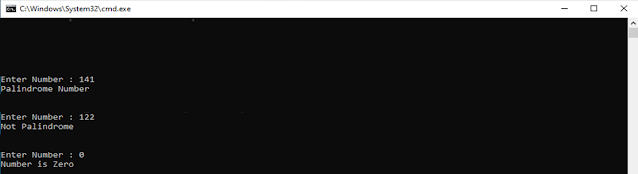


Slip 30 B) Write a java program to design a following GUI (Use Swing).

Answer :

import javax.swing.*;

import java.awt.*;


class Slip30B extends JFrame{


    JLabel l1,l2,l3,l4,l5,l6;

    JTextField t1,t2,t3,t4;

    JButton b1,b2;

    JRadioButton rb1, rb2;

    JCheckBox ch1,ch2,ch3;

    Panel p1,p2,p3,p4,p5,p6;

    GridLayout g1,g2,g3,g4,g5,g6,g7;

    JFrame jf;


    public Slip30B(){

        jf = new JFrame();


        l1 = new JLabel("",JLabel.CENTER);

        l1.setText("<HTML><U>Personal Information</U></HTML>");

        p1 = new Panel();

        g1 = new GridLayout(1,1);

        p1.setLayout(g1);

        p1.add(l1);

        l1.setFont( new Font("Times New Roman",Font.BOLD,20));


        l2 = new JLabel(" First Name : ");

        t1 = new JTextField(30);

        l3 = new JLabel(" Last Name : ");

        t2 = new JTextField(30);

        p2 = new Panel();

        g2 = new GridLayout(2,1);

        p2.setLayout(g2);

        p2.add(l2);

        p2.add(t1);

        p2.add(l3);

        p2.add(t2);


        l4 = new JLabel(" Address : ");

        t3 = new JTextField(30);

        l5 = new JLabel(" Mobile Number : ");

        t4 = new JTextField(30);

        p3 = new Panel();

        g3 = new GridLayout(2,1);

        p3.setLayout(g3);

        p3.add(l4);

        p3.add(t3);

        p3.add(l5);

        p3.add(t4);


        l5 = new JLabel(" Gender ");

        rb1 = new JRadioButton("Male");

        rb2 = new JRadioButton("Female");

        ButtonGroup bg = new ButtonGroup();

        bg.add(rb1);

        bg.add(rb2);

        p4 = new Panel();

        g4 = new GridLayout(1,2);

        p4.setLayout(g4);

        p4.add(l5);

        p4.add(rb1);

        p4.add(rb2);


        l6 = new JLabel(" Your Interests");

        ch1 =  new JCheckBox("Comuter");

        ch2 =  new JCheckBox("Sport");

        ch3 =  new JCheckBox("Music");


        p5 = new Panel();

        g5 = new GridLayout(1,2);

        p5.setLayout(g5);

        p5.add(l6);

        p5.add(ch1);

        p5.add(ch2);

        p5.add(ch3);


        b1 = new JButton("Submit");

        b2 = new JButton("Reset");


        p6 = new Panel();

        g6 = new GridLayout(1,1,400,10);

        p6.add(b1);

        p6.add(b2);


        this.setSize(500,250);

        this.setVisible(true);


        g7 = new GridLayout(6,1);

        this.setLayout(g7);

        this.add(p1);

        this.add(p2);

        this.add(p3);

        this.add(p4);

        this.add(p5);

        this.add(p6);

    }

    public static void main(String args[]){

        new Slip30B();

    }

}

Output :


Savitribai Phule Pune University T.Y.B.B.A.(C.A.) Core Java Practical Slip 30 Answers Savitribai Phule Pune University T.Y.B.B.A.(C.A.) Core Java Practical Slip 30 Answers Reviewed by technical_saurabh on December 30, 2021 Rating: 5

Savitribai Phule Pune University T.Y.B.B.A.(C.A.) Core Java Practical Slip 29 Answers

December 30, 2021

 Write a ‘java’ program to display

Slip 29 A) Write a java program to check whether given candidate is eligible for voting or not. Handle user defined as well as system defined Exception.

Answer :

import java.io.*;

class NumOutRange extends Exception{}

class Slip29A{

    static int n;

    public static void main( String args[]){

        DataInputStream dr = new DataInputStream(System.in);

        try {

            System.out.print("Enter Age : ");

            n = Integer.parseInt(dr.readLine());

            if(n<18){

                throw new NumOutRange();

            }else{

                System.out.print("You Are eligible For Voting :) ");

            }

        } catch (NumOutRange nz) {

            System.out.println("You Are Not eligible For Voting ....!");

        }

        catch (Exception e){}

    }

}

Output :

Slip 29 B) Write a java program using Applet for bouncing ball. Ball should change its color for each bounce.

Answer :

import java.applet.*;

import java.awt.*;


public class Slip29B extends Applet implements Runnable {

    Thread t = null;

    int x1 = 10;

    int y1 = 300;

    int flagx1, flagy1;

    int R, G, B;


    public void start() {

        t = new Thread(this);

        t.start();

    }


    public void color(){

        R = (int) (Math.random() * 256);

        G = (int) (Math.random() * 256);

        B = (int) (Math.random() * 256);

    }

    public void run() {

        for (;;) {

            try {

                repaint();

                if (y1 <= 50) {

                    flagx1 = 0;

                    color();

                } else if (y1 >= 300) {

                    flagx1 = 1;

                    color();

                }

                if (x1 <= 10) {

                    flagy1 = 0;

                    color();

                } else if (x1 >= 400) {

                    flagy1 = 1;

                    color();

                }

                Thread.sleep(10);

            } catch (InterruptedException e) {

            }

        }

    }


    public void paint(Graphics g) {

        Color color = new Color(R, G, B);

        g.setColor(color);

        g.fillOval(x1, y1, 20, 20);

        if (flagx1 == 1)

            y1 -= 2;

        else if (flagx1 == 0)

            y1 += 2;

        if (flagy1 == 0)

            x1 += 4;

        else if (flagy1 == 1)

            x1 -= 4;

    }

}


/*

 * <applet code="Slip29B.class" width="420" height="320">

 * </applet>

 */


Output :

Write a java program using Applet for bouncing ball. Ball should change its color for each bounce.


Savitribai Phule Pune University T.Y.B.B.A.(C.A.) Core Java Practical Slip 29 Answers Savitribai Phule Pune University T.Y.B.B.A.(C.A.) Core Java Practical Slip 29 Answers Reviewed by technical_saurabh on December 30, 2021 Rating: 5

Savitribai Phule Pune University T.Y.B.B.A.(C.A.) Core Java Practical Slip 28 Answers

December 30, 2021

 Write a ‘java’ program to display

Slip 28 A) Write a java program to count the number of integers from a given list. (Use Command line arguments).

Answer :

import java.util.*;


public class Slip28A {

    public static void main(String[] args) {

        int count = 0;

        List<String> al = new ArrayList<>();

        for (int i = 0; i < args.length; i++) {

            al.add(args[i]);

        }

        for (int i = 0; i < al.size(); i++) {

            String element = al.get(i);

            try {

                int j = Integer.parseInt(element);

                count++;

            } catch (NumberFormatException e) {}

        }

        System.out.println(count + " integers present in list");

    }

}

Output :


Slip 28 B) Write a java Program to accept the details of 5 employees (Eno, Ename, Salary) and display it onto the JTable.

Answer :

import javax.swing.*;

public class Slip28B {

    JFrame f;

    JTable j;

    Slip28B(){

        f = new JFrame();

        f.setTitle("Employee Details");

        String data[][] = {

            {"1","Radhika Sapkal","50,000"},

            {"2","Ramesh Devakar","20,000"},

            {"3","Hardik Shrinivas","25,000"},

            {"4","Bhihari Kumar","20,000"},

            {"5","Swaraghini Pawar","15,000"},

        };

        String[] columnNames = {"Eno", "Ename", "Salary" };

        j = new JTable(data, columnNames);

        j.setBounds(30,40,200,300);

        JScrollPane sp = new JScrollPane(j);

        f.add(sp);

        f.setSize(500,200);

        f.setVisible(true);

    }


    public static void main(String args[]) {

        new Slip28B();

    }

}

Output :


Savitribai Phule Pune University T.Y.B.B.A.(C.A.) Core Java Practical Slip 28 Answers Savitribai Phule Pune University T.Y.B.B.A.(C.A.) Core Java Practical Slip 28 Answers Reviewed by technical_saurabh on December 30, 2021 Rating: 5

Savitribai Phule Pune University T.Y.B.B.A.(C.A.) Core Java Practical Slip 27 Answers

December 30, 2021

 Write a ‘java’ program to display

Slip 27 A) Write a java program to accept a number from user, If it is greater than 1000 then throw user defined exception “Number is out of Range” otherwise display the factors of that number. (Use static keyword)

Answer :

import java.io.*;

class NumOutRange extends Exception{}

class Slip27A{

    static int n;

    public static void main( String args[]){

        DataInputStream dr = new DataInputStream(System.in);

        try {

            System.out.print("Enter Number : ");

            n = Integer.parseInt(dr.readLine());

            if(n>1000){

                throw new NumOutRange();

            }else{

                for(int i=1; i<n; i++){

                    if(n%i==0){

                        System.out.println(i + " ");

                    }

                }

            }

        } catch (NumOutRange nz) {

            System.out.println("Num is out of range..!");

        }

        catch (Exception e){

            System.out.println(""+e.getMessage());

        }

    }

}

Output :

Slip 27 B) Write a java program to accept directory name in TextField and display list of files and subdirectories in List Control from that directory by clicking on Button.

Answer :

import java.awt.*;

import java.awt.event.*;

import java.io.*;


public class Slip27B extends Frame implements ActionListener{

    Graphics g;

    List l;

    TextField t1;

    Button b1;

    Label l1;


    public Slip27B(){

        this.setLayout(new FlowLayout());

        this.setSize(400,400);

        this.setVisible(true);

        l1 = new Label("Enter Directory ");

        t1 = new TextField(20);

        l = new List(10);

        b1 = new Button("Display");

        l1.setBounds(50,100,80,80);

        t1.setBounds(50,150,80,80);

        b1.setBounds(50,200,80,80);

        l.setBounds(50,300,100,100);

        add(l1);

        add(t1);

        add(b1);

        add(l);

        b1.addActionListener(this);

    }


    public void actionPerformed(ActionEvent e){

        if(e.getSource()==b1){

            try{

                String nm = t1.getText();

                File f1 = new File(nm + ":");

                String s1[]=f1.list();

                if(s1==null){

                    System.out.println("Dir not exist");

                }else{

                    for(int i=0; i<s1.length; i++){

                        l.add(s1[i]);

                    }

                }

            }catch(Exception ee){}

        }

    }

    public static void main(String args[]){

        new Slip27B();

    }

}

Output :

Write a java program to accept directory name in TextField and display list of files and subdirectories in List Control from that directory by clicking on Button.


Savitribai Phule Pune University T.Y.B.B.A.(C.A.) Core Java Practical Slip 27 Answers Savitribai Phule Pune University T.Y.B.B.A.(C.A.) Core Java Practical Slip 27 Answers Reviewed by technical_saurabh on December 30, 2021 Rating: 5

Savitribai Phule Pune University T.Y.B.B.A.(C.A.) Core Java Practical Slip 26 Answers

December 30, 2021

 Write a ‘java’ program to display

Slip 26 A) Write a java program to display ASCII values of the characters from a file.

Answer :

import java.io.*;

class Slip26A{

    public static void main(String args[]) throws IOException{

        char ch;

        FileReader fr = new FileReader("a.txt");

        int c;

        while ((c=fr.read())!=-1){

            ch=(char)c;

            if(Character.isDigit(ch)==false && (Character.isSpaceChar(c)==false)){

                System.out.println("ASCII "+ch+" : "+ c);

            }

        }

        fr.close();

    }

}

Output :


Slip 26 B) Write a java program using applet to draw Temple.

Answer :

import java.applet.Applet;

import java.awt.Color;

import java.awt.Graphics;

public class Slip26B extends Applet{


    public void init() {

        setBackground(Color.BLACK);

    }

public void paint(Graphics g){

    g.setColor(Color.WHITE);

    g.drawRect(100, 150, 90, 120);

    g.drawRect(130, 230, 20, 40);

    g.drawLine(150, 100, 100, 150);

    g.drawLine(150, 100, 190, 150);

    g.drawLine(150, 50, 150, 100);

    g.setColor(Color.ORANGE);

    g.drawRect(150, 50, 20, 20);

}


}

/*

<applet code="Slip26B.class" width="300" height="300">

</applet>

*/

Output :


Savitribai Phule Pune University T.Y.B.B.A.(C.A.) Core Java Practical Slip 26 Answers Savitribai Phule Pune University T.Y.B.B.A.(C.A.) Core Java Practical Slip 26 Answers Reviewed by technical_saurabh on December 30, 2021 Rating: 5
Powered by Blogger.