Results for Web Technology

Web Technology Slip 10

December 21, 2020
Q1. Write a JavaScript Program to read a number from user, store its factors into the array and display that array. (Handle onClick Event).

Q1. Write a JavaScript Program to read a number from user, store its factors into the array and display that array. (Handle onClick Event).

Answer : 


Q2. Write HTML code which generates the following output and display each element  of list in different size, color & font. Use inline CSS to format the list.
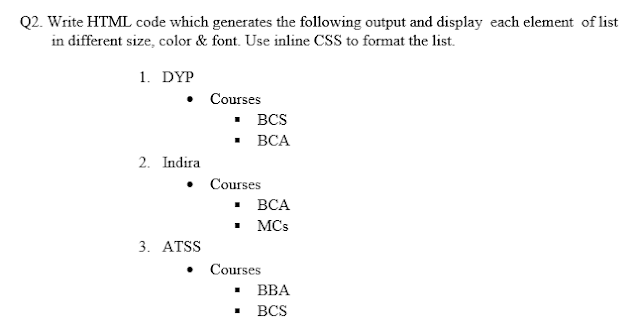
Q2. Write HTML code which generates the following output and display  each element  of list           in different size, color & font. Use inline CSS to format the list.
Answer : 

Web Technology Slip 10 Web Technology Slip 10 Reviewed by technical_saurabh on December 21, 2020 Rating: 5

Web Technology Slip 9

December 21, 2020

 Q1. Write a java script program to accept a string and check whether the input string is palindrome string or not .

Answer : 

<html>
<head>
<script>
function myFunction()
{
var str = document.getElementById('txtbox').value;
var result = checkPalindrome(str);
alert('The Entered String "'+str +'" is "'+result+'"');
}
function checkPalindrome(str)
{
var orignalStr;

str = str.toLowerCase();
orignalStr = str;
str = str.split(''); 
str = str.reverse(); 
str = str.join(''); 
var reverseStr = str;
if(orignalStr == reverseStr){
return 'Palindrome'; 
}else{
return 'Not Palindrome';
}
}
</script>
</head>
<body>
<form >
<input type="text" id="txtbox" placeholder="Enter String" />
<input type="button" onclick="myFunction()" value="Check Palindrome" />
</form>
</body>
</html>

Q2. Write the HTML code which generates the following output.(use internal CSS to format the table.


Answer : 

<!DOCTYPE html>
<html>
<title>assignment3</title>
<body>
 <table width="40%" align="left" cellpadding="1" cellspacing="5"  border="1">
 <tr>
    <td>Country</td>
    <td colspan="2">Population(in Crores)</td>
 </tr>

 <tr>
   <td rowspan="3">INDIA</td>
    <td>1998</td>
    <td>85</td> 
  </tr>

  <tr>
    <td>1999</td>
    <td>90</td> 
  </tr>

  <tr>
    <td>2000</td>
    <td>100</td>  
  </tr>

<tr>
   <td rowspan="3">USA</td>
    <td>1998</td>
    <td>30</td> 
  </tr>

  <tr>
    <td>1999</td>
    <td>35</td> 
  </tr> 

  <tr>
    <td>2000</td>
    <td>40</td>  
  </tr>

<tr>
   <td rowspan="3">UK</td>
    <td>1998</td>
    <td>25</td> 
  </tr>

  <tr>
    <td>1999</td>
    <td>30</td> 
  </tr> 

  <tr>
    <td>2000</td>
    <td>35</td>  
  </tr>
  
</table> 
</body>
</html>

Web Technology Slip 9 Web Technology Slip 9 Reviewed by technical_saurabh on December 21, 2020 Rating: 5

Web Technology Slip 8

December 21, 2020

 Q1. Write a java script program to accept a string and character from user and check the count of occurrences of that character in string.

Answer : 

<!DOCTYPE html>
<html>
   <body>
      <script>
         function displayCount() {
            setTimeout(function() {
               var str = document.getElementById('str1').value;
               var letter = document.getElementById('letter1').value;
               letter = letter[letter.length-1];

               var lCount;
               for (var i = lCount = 0; i < str.length; lCount += (str[i++] == letter));
               document.querySelector('p').innerText = lCount;
               return lCount;
            }, 50);
         }
      </script>
      Enter String: <input type="text" id="str1"><br><br>
      Enter Letter: <input onkeypress="displayCount()" type="text" id="letter1"><br><br>
      <button onclick="displayCount()">Click for Result</button><br><br>
      result= <p></p>
   </body>
</html>


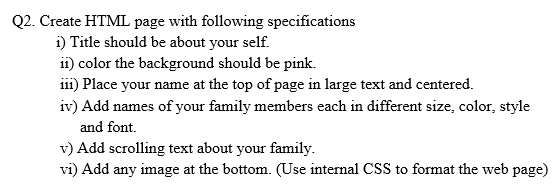
Q2. Create HTML page with following specifications  i) Title should be about your self. ii) color the background should be pink. iii) Place your name at the top of page in large text and centered. iv) Add names of your family members each in different size, color, style       and font. v) Add scrolling text about your family. vi) Add any image at the bottom. (Use internal CSS to format the web page) 

Q1. Write a java script program to accept a string and character from user and check the count of         occurrences of that character in string.

Answer : 

<html>
<head>
<title>My Self</title>
</head>
<body bgcolor="pink">
<h1 align="center" style="color:blue; font-family:arial; ">Enter Your Name</h1>

<p style ="font-family:Albertus Extra Bold; color: #FF7F50 ; font-size:20;" >Enter Your Name</p>

<p  style ="font-family:Lucida Console; color:#FF4500 ; font-size:12;" >Enter Your friend Name</p>

<p  style ="font-family:Bahnschrift Light SemiCondensed; color:#228B22; font-size:15;" >Enter Your friend Name</p>

<p  style ="font-family:Bodoni Poster; color:#2E8B57; font-size:14;" >Enter Your friend Name</p>

<p  style ="font-family:Chicago; color: #00FFFF; font-size:22;" >Enter Your friend Name</p>

<p  style ="font-family:Copperplate33bc; color: #008B8B; font-size:25;" >Enter Your friend Name</p>

<p  style ="font-family:GillSans ExtraBold; color:#7B68EE; font-size:26;" >Enter Your friend Name</p>

<img src="1.jpeg" style="height:50px; width:500px; align:center;">

<div id="footer" >copyright@2020 Design By Enter Your Name </div>
</body>

</html>

Web Technology Slip 8 Web Technology Slip 8 Reviewed by technical_saurabh on December 21, 2020 Rating: 5
Web Technology Slip 7

December 21, 2020

Q1. Write a java script program to accept a string from user and display the count of vowel characters from that string.

Answer : 

<html>
<head>
<script>
function saurabh() 
{
var str = document.getElementById('a').value;
var count = 0;
for (var i = 0; i < str.length; i++) 
{
if (str.charAt(i).match(/[aeiouAEIOU]/))
{
count++;
}
}
alert(count);
}
</script>
</head>
<body>
Enter Text   : <input  id='a'> </br></br>
<button onclick="saurabh()">click</button>
</body>
</html>

Q2. Write a HTML code to display Theory Time Table of FYBBA(CA). Use internal CSS to format the table.

Q2. Write a HTML code to display Theory Time Table of FYBBA(CA). Use internal CSS to          format the table


Answer : 

<!DOCTYPE html>
<html>
<title>assignment3</title>
<body>
 <table width="100%" align="left" cellpadding="20" cellspacing="20"  border="1" color="red">

  <tr align="center">
    <th>Monday</th>
    <th>Tuesday</th>
  <th>Wednesday</th>
  <th>Thursday</th>
  <th>Friday</th>
  <th>Saturday</th>
  </tr>
  
  <tr align="center">
    <td>RD/AAB</td>
    <td>RD/AAB</td>
    <td>RD/AAB</td>
  <td>BM/PPk</td>
  <td>FAC/TST</td>
  <td>Advc/SNB</td>
  </tr>
  
  <tr align="center">
    <td>RD/AAB</td>
    <td>RD/AAB</td>
    <td>RD/AAB</td>
  <td>BM/PPk</td>
  <td>FAC/TST</td>
  <td>Advc/SNB</td>
  </tr> 
  
  <tr align="center">
    <td>RD/AAB</td>
    <td>RD/AAB</td>
    <td>RD/AAB</td>
  <td>BM/PPk</td>
  <td>FAC/TST</td>
  <td>Advc/SNB</td>
  </tr>
  
  <tr align="center">
  <td>RD/AAB</td>
    <td>RD/AAB</td>
    <td>RD/AAB</td>
  <td>BM/PPk</td>
  <td>FAC/TST</td>
  <td>Advc/SNB</td>
  </tr>
  
</table> 

</body>
</html>

Web Technology Slip 7 Web Technology Slip 7 Reviewed by technical_saurabh on December 21, 2020 Rating: 5

Web Technology Slip 6

December 21, 2020

Q1. Write java script program to accept a number from user and check whether it is prime number or not.

Answer:

<html>
<head>
<script>
function saurabh()
{
var num, i;
num = Number(document.getElementById('M').value);
for(i=2; i<num; i++)
{
if(num%2==0)
{
break;
}
}
if(i==num)
{
alert(num + "is prime");
}
else
{
alert(num + "is not prime");
}
}
</script>
</head>
<body>
<input type="text" id="M">
<button onclick="saurabh()">click</button>
</body>
</html

Q2. Write a HTML code to display calendar of current month in tabular format. Use proper color for week days and holidays.  Display month name, year and images as advertisement at the beginning of the calendar.

Answer : 

<HTML>
<HEAD>
<TITLE> Calendar </TITLE>
</HEAD>

<BODY>
<img src="1.png" height="80" width="475" border="5">
<TABLE Cellpadding="10" border="10" cellspacing="10">
<CAPTION> <H1> <img src="1.png" height="40" width="70" border="1" align="left">January 2020 <img src="1.png" height="40" width="70" border="1" align="right"></H1></CAPTION>

<TR>
<TH><font color="red">SUN</font></TH>
<TH>MON</TH>
<TH>TUS</TH>
<TH>WED</TH>
<TH>THU</TH>
<TH>FRI</TH>
<TH>SAT</TH>
</TR>

<TR>
<TH> </TH>
<TH> </TH>
<TH> </TH>
<TH>1</TH>
<TH>2</TH>
<TH>3</TH>
<TH>4</TH>
</TR>

<TR>
<TH><font color="red"><b>5</font></TH>
<TH>6</TH>
<TH>7</TH>
<TH>8</TH>
<TH>9</TH>
<TH>10</TH>
<TH>11</TH>
</TR>

<TR>
<TH><font color="red"><b>12</font></TH>
<TH>13</TH>
<TH>14</TH>
<TH>15</TH>
<TH>16</TH>
<TH>17</TH>
<TH>18</TH>
</TR>

<TR>
<TH><font color="red"><b>19</font></TH>
<TH>20</TH>
<TH>21</TH>
<TH>22</TH>
<TH>23</TH>
<TH>24</TH>
<TH>25</TH>
</TR>

<TR>
<TH><font color="red"><b>26</font></TH>
<TH>27</TH>
<TH>28</TH>
<TH>29</TH>
<TH>30</TH>
<TH>31</TH>
<TH> </TH>
</TR>

</TABLE>
</BODY>
</HTML>
Web Technology Slip 6 Web Technology  Slip 6 Reviewed by technical_saurabh on December 21, 2020 Rating: 5

Web Technology Slip 5

December 21, 2020

Q.1 Write a java script program to accept a number from user and check whether it is perfect number or not.

Answer : 

<html>
<head>
<script>
function saurabh()
{
var num,sum=0,i;
num = Number(document.getElementById("M").value);
for(i=1; i<num; i++)
{
if(num%i==0)
{
sum =sum+i;
}
}
if(num==sum)
{
alert(num+ "perfect number");
}
else
{
alert(num + "not perfect number");
}
}
</script>
</head>
<body>
<input id="M">
<button onclick="saurabh()">click</button>
</body>
</html>

Q.2 Write HTML code to design a website for Online Shopping. Design home page which consist of list of items each with hyperlink, clicking on which should display related information on separate web page. (Use external CSS to format each web page).


Answer : 


<html>
<head><title>E-Commerce Side</title>
<link rel="stylesheet" type="text/css" href="style.css">
</head>
<body bgcolor="#f1f3f6">


<div id="two">
<table>
<tr>
<th width="12.5%">Electronics</th>
<th width="12.5%">TV & Appliences</th>
<th width="12.5%">Home & Furniture</th>
<th width="12.5%">Men</th>
<th width="12.5%">Woman</th>
<th width="12.5%">Baby & kids</th>
<th width="12.5%">Offiers</th>
<th width="12.5%">Sports,Books,and more</th>
</tr>
</table>
</div>


<br>
<img src="banner1.jpg" width="100%" height="46%">
<br>
<br>
<div id="three">
<table>
<tr><td colspan="5"><h2>SCHOOL BAGES</h2><hr></td></tr>

<tr>
<th><img src="bag2.jpg" width="75%"></th>
<th><img src="bag3.jpg" width="75%"></th>
<th><img src="bag4.jpg" width="75%"></th>
<th><img src="bag5.jpg" width="75%"></th>
<th><img src="bag2.jpg" width="75%"></th>
</tr>
<tr>
<td align="center"><font size="4" color="green">REDDIT</font></td>
<td align="center"><font size="4" color="green">LEGO</font></td>
<td align="center"><font size="4" color="green">CVZ</font></td>
<td align="center"><font size="4" color="green">NIKE</font></td>
<td align="center"><font size="4" color="green">ADIDAS</font></td>
</tr>
<tr>
<td align="center"><font size="4" color="green"> Price: INR 180/-</font> </td>
<td align="center"><font size="4" color="green"> Price: INR 550/-</font></td>
<td align="center"><font size="4" color="green"> Price: INR 475/-</font></td>
<td align="center"><font size="4" color="green"> Price: INR 350/-</font></td>
<td align="center"><font size="4" color="green"> Price: INR 250/-</font></td>
</tr>
<tr>
<td align="center"><a href="details.html"><input type="button" value="Details" style="width:150px; height:30px; background-color:blue; color:white;"></a></td>
<td align="center"><input type="button" value="Details" style="width:150px; height:30px; background-color:blue; color:white;"></td>
<td align="center"><a href="details.html"><input type="button" value="Details" style="width:150px; height:30px; background-color:blue; color:white;"></a></td>
</tr>
</table>
</div>


<div id="footer">copyright@2020 Design By Enter Your Name</div>
</body>

</html>


CSS


body{
font-family:Courier New;
}

#one > table {
border:0;
width:100%;
background-color:#2874f0;
height:8%;
}
#two > table {
border:0; 
width:100%; 
background-color:white;
height:8%;
}
#three > table {
border:0; 
width:100%; 
background-color:white;
}
#three > table >tr >tr >tr >tr{
width:150px;
height:30px; 
background-color:blue; 
color:white;
}

#footer{
clear:both;
padding:10px;
background-color:#999999;
color:white;
text-align:center;
background-image :url("HERO.gif");
padding-top:10px;
font-family:Courier New;
}


Web Technology Slip 5 Web Technology  Slip 5 Reviewed by technical_saurabh on December 21, 2020 Rating: 5

Web Technology Slip 4

December 21, 2020

 Q1. Write a java script program to accept a number from user and check whether it is Armstrong number or not.

Answer : 

<!doctype html>
<html>
<head>
<script>
function armstr()
{
var arm=0,a,b,c,d,num;
num=Number(document.getElementById("no_input").value);
multi = document.getElementById('pPrint');

temp=num;
while(temp>0)
{
a=temp%10;
temp=parseInt(temp/10);
arm=arm+a*a*a;
}
if(arm==num)
{
    multi.innerHTML += (num+" Armstrong number"+ "<br>");
}
else
{
    multi.innerHTML += (num+" Not Armstrong number"+ "<br>");
}
}
</script>
</head>
<body>
    <form>
        <fieldset>
           <legend>JavaScript Program</legend>    
           <table border="3" bgcolor="black" style="color: aliceblue;">
<tr>
<td style="padding:20 20 20 20">
<p>Q. Write a java script program to accept a number from user and check whether it is Armstrong
    number or not. </p>
Enter any Number: <input id="no_input">
<input type="button" value="Click" onclick="armstr()">
<button type="reset" value="Reset">Reset</button>
<p id="pPrint"></p>
</td>
</tr>
</table>
</form>
</fieldset>
</body>
</html>


 Q.2 Create HTML web page with following specifications i) Title should be about your College. ii) Put image in the background iii) Place your college name at the top of page in large text followed by address in smaller size. iv) Add names of courses offered, each in different color, style and font v) Add scrolling text about college. vi) Add any image at the bottom. (use External CSS to format the webpage) 


Q.2 Create HTML web page with following specifications i) Title should be about your College. ii) Put image in the background iii) Place your college name at the top of page in large text followed by address in smaller size. iv) Add names of courses offered, each in different color, style and font v) Add scrolling text about college. vi) Add any image at the bottom. (use External CSS to format the webpage)


Answer : 

<html>
<title>College</title>
<body>
<link rel="stylesheet" type="text/css" href="style1.css">
<div id="container">
<div id="header">
<h1>Enter Your College Name</h1>
</div>
<marquee><p>New admission open for all faculties  1) BCA  2) BBA (CA)  3) BCS 4) B.com</p></marquee>

<div class="container">
<div id="nav">
<ul type="disk">
<li><a href="bca.html" target="fact">BCA</a></li>
<li><a href="bba.html" target="fact">BBA (CA)</a></li>
<li><a href="bcs.html"  target="fact">BCS</a></li>
<li><a href="bcom.html" target="fact">B.Com</a></li>
</ul>
</div>

<div id="main">
<section>
<img src="jkkk.gif">
<article>
<h2>Home Page</h2>
<p> Cascading Style Sheets (CSS) is a style sheet language used for describing the presentation of a document written in a markup language like HTML. CSS is a cornerstone technology of the World Wide Web, alongside HTML and JavaScript.CSS is designed to enable the separation of presentation and content, including layout, colors, and fonts. This separation can improve content accessibility, provide more flexibility and control in the specification of presentation characteristics, enable multiple web pages to share formatting by specifying the relevant CSS in a separate .css file, and reduce complexity and repetition in the structural content. </p>
<p>Separation of formatting and content also makes it feasible to present the same markup page in different styles for different rendering methods, such as on-screen, in print, by voice (via speech-based browser or screen reader), and on Braille-based tactile devices. CSS also has rules for alternate formatting if the content is accessed on a mobile device</p>
<p>The CSS specifications are maintained by the World Wide Web Consortium (W3C). Internet media type (MIME type) text/css is registered for use with CSS by RFC 2318 (March 1998). The W3C operates a free CSS validation service for CSS documents.
In addition to HTML, other markup languages support the use of CSS including XHTML, plain XML, SVG, and XUL. 
CSS has a simple syntax and uses a number of English keywords to specify the names of various style properties.
A style sheet consists of a list of rules. Each rule or rule-set consists of one or more selectors, and a declaration block.</p>

<p>The name cascading comes from the specified priority scheme to determine which style rule applies if more than one rule matches a particular element. This cascading priority scheme is predictable. </p>

</article>
</section>
</div>

<div id="footer">copyright@2020 Design By Enter Your Name</div>
</div>
</div>
</body>
</html>


Web Technology Slip 4 Web Technology  Slip 4 Reviewed by technical_saurabh on December 21, 2020 Rating: 5

Web Technology Slip 3

December 20, 2020

 Q1. Write a java script program to accept a number form user and calculate and display its sum of digits. 


Answer : 

<html>
<head>
<script>
function saurabh()
{
var num,sum=0,i,str;
num = Number(document.getElementById('v').value);
str = num.toString();
for (i=0; i<str.length; i++)
{
sum += parseInt(str.charAt(i));
}
alert(sum); 
}
</script>
</head>
<input id="v">
<button onclick="saurabh()">click</button>
</html>

 Q2. Write HTML code to design a web as per given specification. Divide the browser screen into two frames. The first frame will display the heading. Divide the second frame into two columns. The frame on the left should be name of cities consisting of hyperlinks. Clicking on any one of these hyperlinks will display related information in right hand side frame as shown below.


Answer : 


File : main_fream.html


<!DOCTYPE html>  
<html>  

    <frameset rows = "30%,*">  
        <frame name = "top" src = "frame_1.html" />  
<frameset cols = "30%,*">  
        <frame name = "main" src = "frame_2.html" />  
         <frame name = "button" src = "frame.html" />  
    </frameset> 
</frameset> 

</html>              


File : frame_1.html


<html>
<title> Assignment no.4 b2</title>
<body>
<head><h1><font> IT Industries in INDIA</h1></head>
</body>
</html>


File : frame_2.html

<html>
<title>Assignment No.4 B1</title>
<body>
<ul>City
<ol type="1">
<li><a href="pune.html" target="button">Pune</a></li>
<li><a href="Mumbai.html" target="button">Mumbai</a></li>
</ol>
</ul>
</body>
</html>


File : Mumbai.html

<html>
<title> Assignment no.4 b2</title>
<body>
<ul type="square">Mumbai
<ul type="circle">
  <li style="color: #FF5733">Infosys</li>
  <li style="color:hsl(300, 100%, 70%)">Persistent</li>
  <li style="color:rgb(255, 204, 0)">Microsoft</li>
</ul>
</ul>
</html>


File : pune.html

<html>
<title> Assignment no.4 b2</title>
<body>
<ul type="square">Pune
<ul type="circle">
  <li style="color: #FF5733">Infosys</li>
  <li style="color:hsl(300, 100%, 70%)">Persistent</li>
  <li style="color:rgb(255, 204, 0)">Microsoft</li>
</ul>
</ul>
</html>              
Web Technology Slip 3 Web Technology  Slip 3 Reviewed by technical_saurabh on December 20, 2020 Rating: 5

Web Technology Slip 2

December 20, 2020

Q1. Write a java script program to accept a number form user and display its multiplication table

Answer:

<html>
<head>
<script>
function multi1()
{
var num , i, multi;
num   = Number(document.getElementById("a").value);
multi = document.getElementById('pPrint');

for(i=1; i<=10; i++)

{
multi.innerHTML += (num*i) + "<br/>" 
}
}
</script>
</head>
<body>
    <form>
        <fieldset>
           <legend>JavaScript Program</legend>    
           <table border="3" bgcolor="black" style="color: aliceblue;">
<tr>
<td style="padding:20 20 20 20">
    <p>Q. Write a java script program to accept a number form user and display its multiplication table </p>
<p><strong>Multiplication Table</strong></p>
Insert Value : <input type="text" id="a">
<input type="button" value="Click" onclick="multi1()">
<button type="reset" value="Reset">Reset</button>
<p id="pPrint"></p>
</td>
</tr>
</table>
</form>
</fieldset>
</body>
</html>
Web Technology Slip 2 Web Technology  Slip 2 Reviewed by technical_saurabh on December 20, 2020 Rating: 5

Web Technology Slip 1

December 20, 2020

Q1. Write a JavaScript program to calculate the volume of a sphere.


Answer : 

Web Technology Slip 1 Web Technology  Slip 1 Reviewed by technical_saurabh on December 20, 2020 Rating: 5
Powered by Blogger.